Free AI Contract Generator
Describe your agreement and our AI drafts a professional, ready-to-edit contract in seconds. Tweak it inline, then export a clean PDF or Word file. No account, no watermark.
One AI contract maker for every agreement
Describe the parties and terms in plain English. The AI returns a structured, clause-by-clause contract you can edit and download.
From plain English to a finished contract in three steps
Describe the deal
Name the parties, the work or goods, the price, the term, and your state. The more detail, the better the draft.
AI drafts the contract
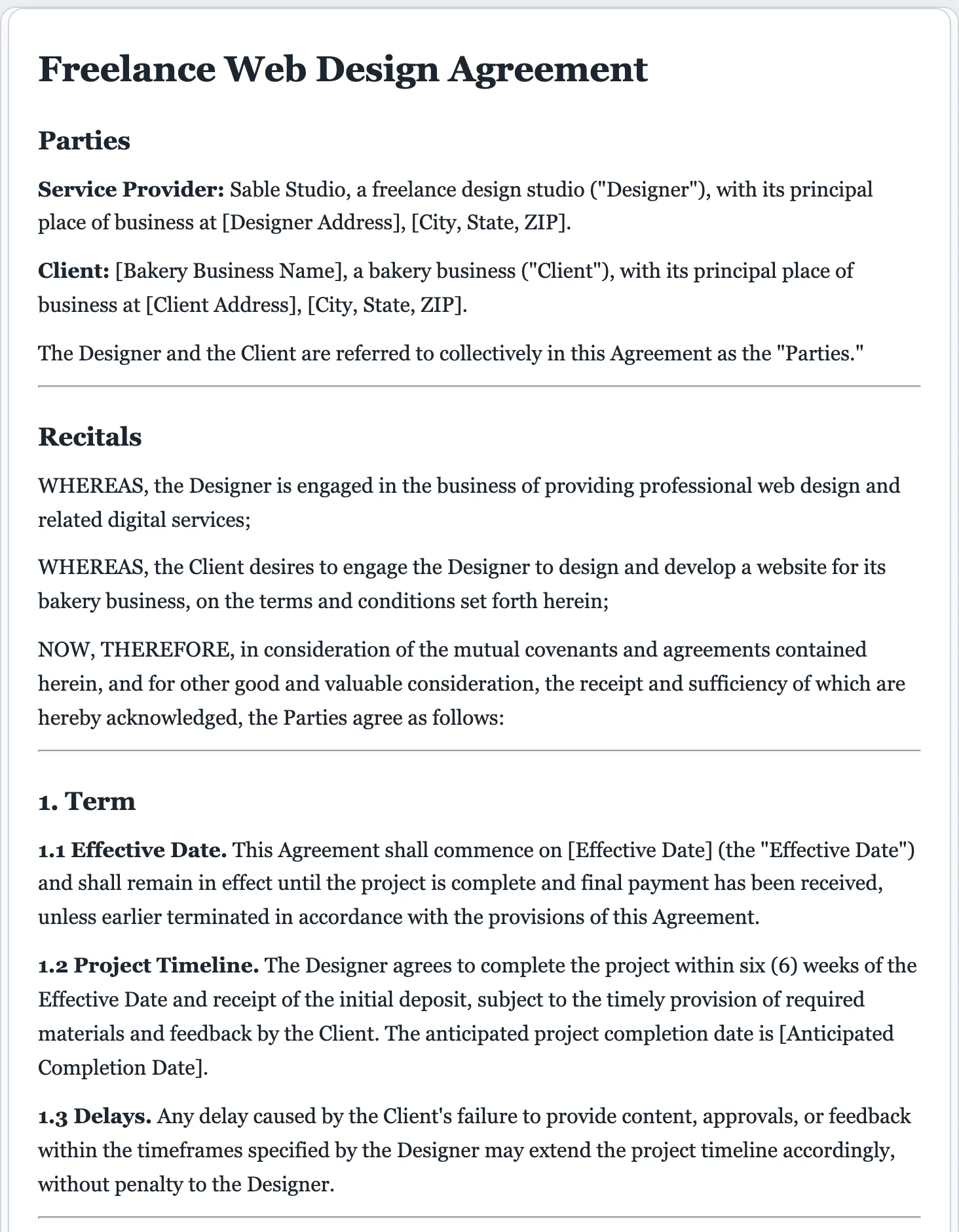
You get a structured agreement. Recitals, clearly numbered clauses, payment terms, termination, and signature blocks.
Edit & download
Click anywhere to edit the live preview, then download a polished PDF or Word file ready to review and sign.
Not just AI. Built on 16,000+ real legal templates.
Most AI contract tools draft from a blank page. FormsPal’s AI contract generator is backed by a library of professionally drafted, attorney-reviewed agreements, so your contract starts from solid ground.
- Clause structure modeled on real, lawyer-reviewed contracts.
- A matching, lawyer-reviewed FormsPal template for when you want a vetted form.
- Export to PDF or Word in a click. Your draft never leaves your browser.
What a well-drafted contract includes
Every draft follows the structure courts and counterparties expect. Keep, cut, or reword any part in the live preview.
- Parties and recitals that name everyone involved and the background to the deal.
- A scope section spelling out exactly what work or goods are provided.
- Payment terms with amounts, schedule, late fees, and currency.
- Term and termination clauses for how long it runs and how either side exits.
- Confidentiality language that protects sensitive information.
- Intellectual-property terms that settle who owns the work product.
- Warranties and representations, the promises each side makes.
- A limitation-of-liability clause that caps what each side can owe.
- Governing law and dispute resolution, tailored to your state.
- Dated signature blocks for every party.
How to write a contract that holds up
A good contract does one thing well: it removes ambiguity. Whether you draft it with the generator above or write it from scratch, these are the parts that decide whether it actually protects you.
Identify the parties precisely
Use full legal names and entity types, an LLC, a sole proprietor, or an individual. "Acme, LLC" and "Acme Inc." are different parties, and naming the wrong one can make a clause hard to enforce.
Define the scope in specific terms
Vague scope is where most disputes start. Spell out the deliverables, deadlines, and quantities, and say what is explicitly out of scope. The more concrete the description, the less room for disagreement later.
Set clear payment terms
State the amount, the schedule (a deposit, milestones, or net-30), what triggers each payment, and the penalty for paying late. If currency or taxes matter, name them rather than leaving them implied.
Add the protective clauses
Confidentiality, intellectual-property ownership, warranties, limitation of liability, and termination rights are what turn a handshake into real protection. Decide who carries which risk before anyone signs.
Choose a governing law, then sign
Name the state whose law applies and how disputes get resolved, in court or by arbitration, then add dated signature blocks for every party. A contract is generally binding once everyone with capacity agrees to clear terms, exchanges something of value, and signs.
For high-value or unusual agreements, have a licensed attorney review the final draft, or start from a matching lawyer-reviewed FormsPal template.
AI contract generator questions
Is the AI contract generator free?
Yes. You can draft and download contracts for free, with no signup. A modest daily cap keeps things quick and fair for all users.
How does an AI contract generator work?
You describe the parties and key terms in plain English. The AI drafts a structured contract. Recitals, numbered clauses, payment and termination terms, and signature blocks, all modeled on a library of professionally drafted agreements. You then edit the live preview and download it.
Is an AI-generated contract legally binding?
A contract is generally binding when the parties have capacity, agree to clear terms, exchange value, and sign it, regardless of how it was drafted. Our drafts are a strong starting point, not legal advice; for important or high-value agreements, have a licensed attorney review the final contract.
What types of contracts can it create?
Service and consulting agreements, independent contractor and freelance contracts, employment agreements, NDAs, sales and purchase agreements, leases, loan agreements, partnership agreements, and more. Just describe what you need.
Can I edit the contract before downloading?
Yes. The preview is fully editable. Click anywhere to change names, amounts, dates, or clauses, then download a polished PDF or Word file.
What's the difference between a contract and an agreement?
In everyday use they're interchangeable. Technically, every contract is an agreement, but an agreement only becomes a contract when it's legally enforceable, meaning there's an offer, acceptance, something of value exchanged, and intent to be bound. The generator drafts enforceable-style contracts whichever word you prefer.
What makes a contract legally enforceable?
Four things, no matter who drafted it: a clear offer and acceptance, consideration (each side gives something of value), the capacity to contract, and a lawful purpose. Putting the terms in writing and signing them makes a contract far easier to enforce if a dispute ever arises.
Do I need a lawyer to write a contract?
Not to create one, people write enforceable contracts without lawyers every day. But for high-value deals, unusual terms, or anything you're unsure about, a quick attorney review is worth it. Use the generator for the draft, then have a professional check the parts that carry real risk.
Can I add my own clauses?
Yes. Describe any clause you want in plain English and the AI includes it, or add and edit clauses directly in the live preview before you download.
Will the contract reflect my state's law?
Mention your state and the AI tailors the governing-law clause and structure to it. For state-specific requirements on certain contract types, confirm with a local attorney or start from a state-specific FormsPal template.
Is this legal advice?
No. FormsPal is not a law firm and the drafts are for informational purposes only. For tailored legal advice, consult a licensed attorney; for a vetted starting point, use a matching lawyer-reviewed FormsPal template.
Draft your contract free
Describe your agreement and get a professional, editable contract in seconds.
A dedicated generator for every document
Each one is tuned for its document type, with the right structure and guided fields. Open the generator you need, or start from the tool above.