Free AI Legal Document Generator
Describe the legal document you need and our AI drafts it in seconds. Contracts, agreements, notices, and more. Adjust the wording in the live preview and save to PDF or Word. Free, and no sign-up.
Draft the legal document you need
From agreements to notices, describe it in plain English and get a structured, clause-by-clause legal document you can edit and download.
From plain English to a finished legal document in three steps
Describe what you need
Name the document, the parties, the key terms, and your state. The more detail, the better the draft.
AI drafts the document
You get a structured, state-aware legal document. Recitals, numbered clauses, and signature blocks.
Edit & download
Click anywhere to edit the live preview, then download a polished PDF or Word file ready to review and sign.
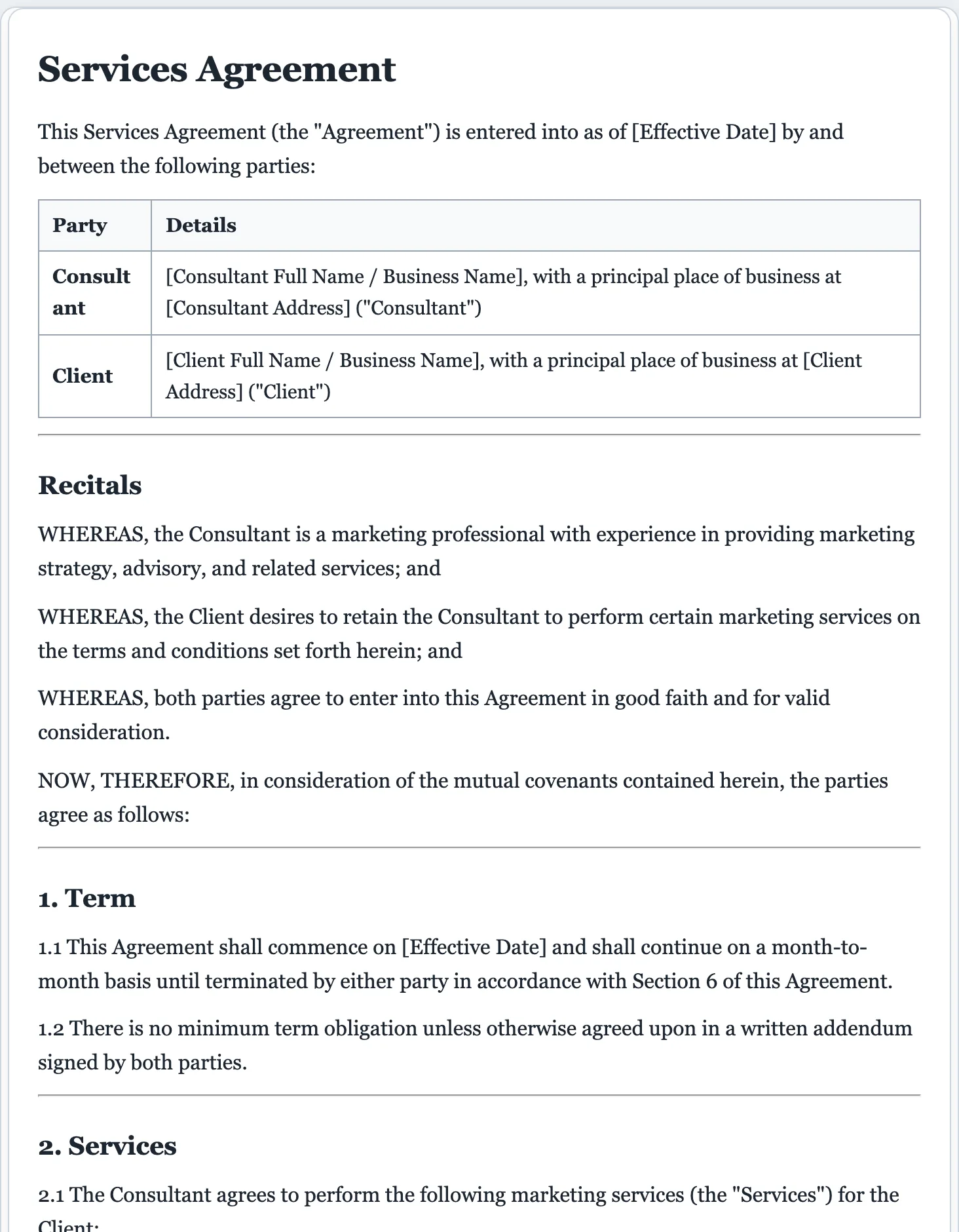
From a legal-forms company, not a generic AI.
FormsPal has provided professionally drafted, attorney-reviewed legal forms for years. Our AI legal document generator drafts from that same library, so your document starts from real legal structure. Not a blank page.
- Structure and clauses modeled on real, lawyer-reviewed documents.
- State-aware language for documents where jurisdiction matters.
- A matching lawyer-reviewed template whenever you want a vetted form.
What a valid legal document needs
Whatever document you draft, the AI structures it with the parts that make it clear and enforceable. Edit any of them in the live preview.
- A clear title that identifies the document type.
- The full legal names of every party or signer.
- Recitals or background explaining the document's purpose.
- Numbered clauses or sections in a logical order.
- Defined terms so key words mean the same thing throughout.
- The operative terms, what each party agrees to or declares.
- State-specific language where jurisdiction matters.
- An effective date and any other required dates.
- Signature blocks, with notary or witness lines where needed.
- Plain, consistent formatting that reads professionally.
How to create a legal document
You don't need a law degree to produce a clean, usable legal document. You need the right structure and clear terms. Here's the path most documents follow.
Name the document and its purpose
Start with the exact document you need, an NDA, a power of attorney, a demand letter, a bill of sale, and a one-line statement of what it's meant to accomplish. The AI tailors the structure to the type.
Identify every party correctly
Use full legal names and the right roles (grantor and agent, buyer and seller, landlord and tenant). The wrong name or role is one of the most common reasons a document fails to do its job.
Spell out the operative terms
State plainly what each party agrees to, declares, or authorizes. Keep one idea per clause, number them, and define any term you'll reuse so there's no ambiguity later.
Add the state-specific and formal requirements
Some documents must follow your state's wording, and some need a notary or witnesses to be valid. Name your state and the AI adapts the language; the draft shows where a signature, notarization, or witness is expected.
Review, sign, and execute
Read the whole draft, edit anything in the live preview, then sign and date it, adding notarization or witnesses where required. A document is generally valid once it's properly completed, signed, and executed.
For important matters, have a licensed attorney review the final document, or start from a matching lawyer-reviewed FormsPal template.
AI legal document generator questions
Is there an AI tool to create legal documents?
Yes. This is one. Describe the legal document you need in plain English and the AI drafts a formatted, downloadable document modeled on professionally drafted legal forms. You can edit it and download a PDF or Word file.
Is the AI legal document generator free?
Yes. You can create and download legal documents for free, with no signup. There is a light daily cap so the generator stays fast for everyone.
Why use a dedicated AI legal document generator instead of a chatbot?
A general chatbot returns plain text. FormsPal’s AI legal document generator gives you a properly formatted, downloadable document, with document-specific structure, numbered clauses, signature blocks, one-click PDF and Word export, and a library of 16,000+ real legal templates behind it.
Are AI-generated legal documents legally valid?
A document is generally valid when it’s properly completed, signed, and (where required) witnessed or notarized, regardless of how it was drafted. Our drafts are a strong starting point, not legal advice; for important matters, have a licensed attorney review the final document.
What legal documents can it create?
Contracts and agreements, NDAs, powers of attorney, leases, demand and notice letters, affidavits, LLC operating agreements, bills of sale, and more. Just describe what you need.
Is this legal advice?
No. FormsPal is not a law firm and the drafts are for informational purposes only. For tailored legal advice, consult a licensed attorney; for a vetted starting point, use a matching lawyer-reviewed FormsPal template.
Can I make my own legal documents without a lawyer?
Yes. People prepare valid legal documents themselves all the time, especially routine ones like NDAs, bills of sale, demand letters, and simple agreements. For complex, high-value, or unusual matters, have a licensed attorney review the final draft.
Do legal documents need to be notarized or witnessed?
It depends on the document and your state. Many agreements are valid on signatures alone, while wills, powers of attorney, deeds, and some affidavits often require a notary or witnesses. The draft notes where notarization or witnesses are typically expected.
Will the document follow my state's law?
Mention your state and the AI uses state-aware structure and language where jurisdiction matters. For documents with strict statutory requirements, confirm the specifics with a local attorney or a state-specific FormsPal template.
Can I edit the document before downloading?
Yes. Every draft is fully editable. Click anywhere in the live preview to change names, terms, dates, or whole clauses, then download a PDF or Word file.
How do I make a legal document enforceable?
Use clear, specific terms, identify the parties correctly, make sure everyone signs (and notarizes or witnesses where required), and keep the purpose lawful. Putting it in writing and signing is what makes terms straightforward to enforce.
Draft your legal document free
Describe what you need and get a professional, editable legal document in seconds.
A dedicated generator for every document
Each one is tuned for its document type, with the right structure and guided fields. Open the generator you need, or start from the tool above.