Free AI Proposal Generator
Describe the client and the project, and our AI drafts a persuasive proposal: overview, scope of work, timeline, and a pricing table. Edit it in the live preview, then send it as a PDF or Word file. Free to use, no account.
A proposal for any pitch
Tell the AI who you’re pitching and what you’ll deliver. It frames the problem, lays out your approach, and prices the work, so you send something polished instead of starting cold.
From a brief to a finished proposal in three steps
Describe the client and project
Who you’re pitching, the problem you solve, and what you’ll deliver.
AI writes the proposal
Overview, understanding of needs, scope, timeline, a pricing table, and clear next steps.
Edit & download
Adjust the scope or pricing, then download a polished PDF or Word file to send.
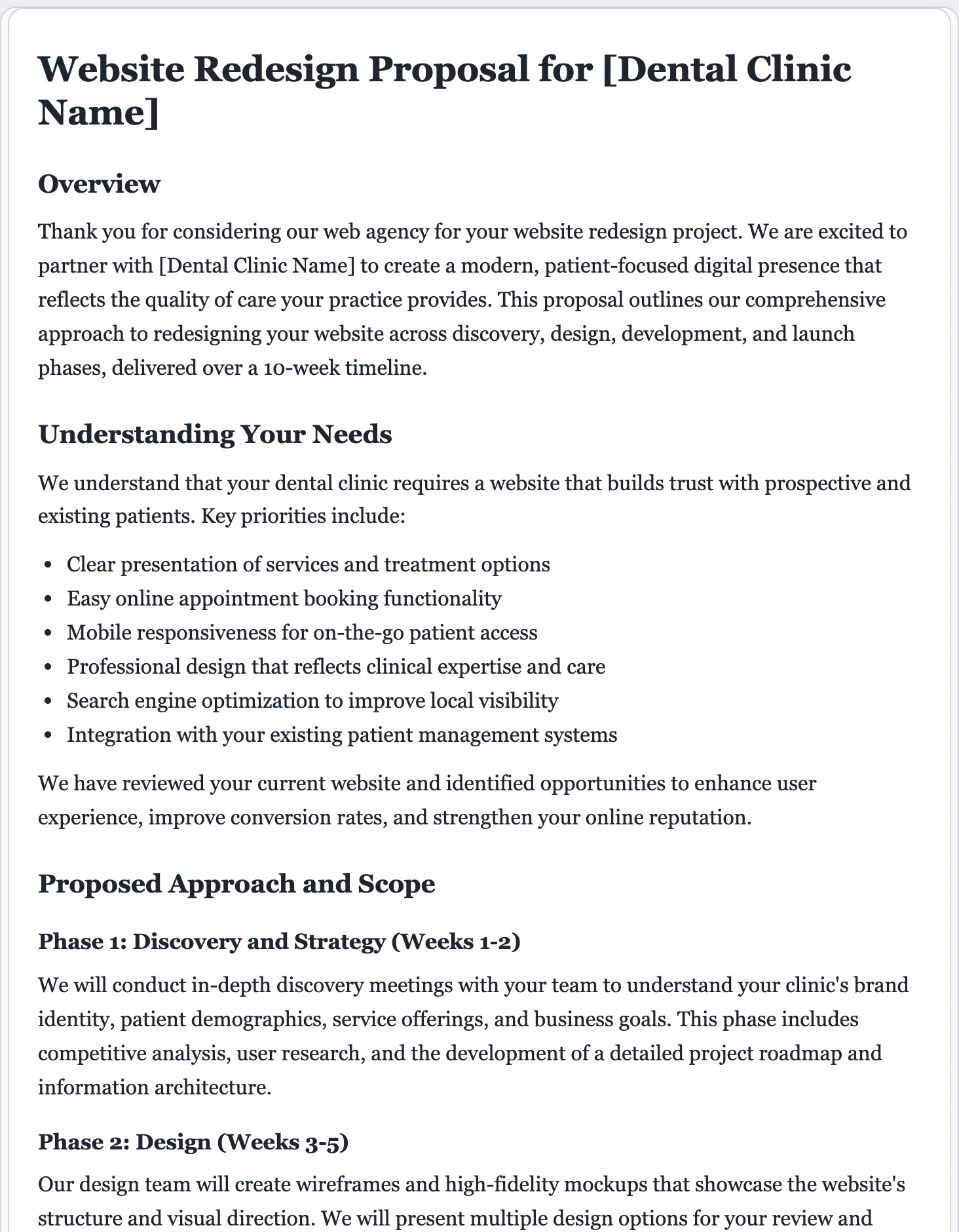
Everything a winning proposal needs
A good proposal does more than list a price. It shows the client you understand their problem and have a clear plan to solve it. The AI builds that case for you, section by section.
- A clear overview and understanding of the client’s needs
- Your proposed approach and scope of work
- A timeline with phases and milestones
- A pricing table you can adjust line by line
- A why-choose-us section with your qualifications
- Clear next steps and a call to action
Once the proposal is accepted, bill the work with a matching invoice, or formalize the deal with a contract. Raising money for the whole business? See the business plan generator.
Proposals that close, minus the busywork.
Writing a proposal from scratch for every lead burns the time you could spend doing the work. Describe the job once and get a structured, persuasive draft you can tailor and send the same day.
- Overview, scope, timeline, and pricing in one structured draft.
- Fully editable. Set pricing tiers or define the scope precisely in the preview.
- Export to PDF or Word instantly. Your proposal isn't stored anywhere by us.
AI proposal generator questions
Is the AI proposal generator free?
Yes. You can write and download proposals for free, with no signup. We set a light daily cap so the generator stays quick for everyone.
What kinds of proposals can it write?
Business, project, consulting, and services proposals, grant and sales proposals, RFP responses, and partnership proposals. Describe the pitch and the AI structures it accordingly.
How does the AI proposal generator work?
Describe the client, the problem you solve, and what you’ll deliver. The AI writes a proposal with an overview, scope of work, timeline, pricing table, and next steps, which you then edit and download.
Does it include a pricing table?
Yes. The proposal includes an itemized pricing table with placeholder amounts. Set your real figures and tiers in the live preview before you send it.
Can I tailor it to a specific client?
Yes. The more you tell the AI about the client and project, the more specific the proposal. You can also refine the tone and detail after it generates.
Can I edit the proposal before sending?
Yes. Every section is fully editable. Click anywhere to rewrite content, or use the refine options to add an executive summary or sharpen the scope.
Can it include pricing and a timeline?
Yes. Describe the scope, deliverables, and budget, and the AI builds a proposal with a pricing table and a timeline. Edit the figures and milestones in the preview before you export to PDF or Word.
Can I reuse a proposal as a template?
Yes. Generate one, edit it to fit your standard offering, and download a copy you can adapt for the next client instead of starting over each time.
Write your proposal free
Describe the client and project, and get a persuasive, ready-to-send proposal in seconds.
A dedicated generator for every document
Each one is tuned for its document type, with the right structure and guided fields. Open the generator you need, or start from the tool above.